On-Device AI Photo Curation on iPhone (Apple Vision, No Uploads)
You just got back from the coast with 120 photos. The golden hour shot of the family, the kid chasing waves, that one perfect wave curl. Then the 30 near-identical bursts, the blurry ones from moving too fast, the screenshots of the map, and a handful of duds.
You want a real printed album that feels like the weekend, not a dump of every frame.
Most apps solve this by sending everything to the cloud first. Full-resolution files get downsized, uploaded, analyzed on someone else's servers, and sometimes folded into their next training run. Your memories leave your phone.
Pressbook keeps every pixel on your iPhone. The scoring, the duplicate detection, the chapter finding, the flagging of weak shots all run locally with Apple's Vision framework. The same tools that power the built-in Photos app, but applied to building a story you can actually print. No sign-up. No internet required after the photos are on the device. Nothing leaves.
The AI gives you a strong first cut. You stay in control. Here's exactly how the signals turn into decisions.

Why the usual "AI photo album" approach feels wrong
You select 80-150 photos from a trip. You want something that feels edited and intentional.
Cloud-based tools promise magic, but here's what actually happens behind the curtain:
- Your originals get downsampled before the AI ever sees them. Subtle expressions, fine light detail, and burst timing get lost.
- The images often become part of training datasets for the company's next model.
- Your memories sit on remote servers that can be subpoenaed, breached, or simply changed by policy.
Pressbook skips all of it. The analysis runs on the original full-resolution files that never leave your device. You keep every pixel, every timestamp, every burst sequence. The chapters that come out actually match how the day felt.
What the Vision framework actually measures on every photo
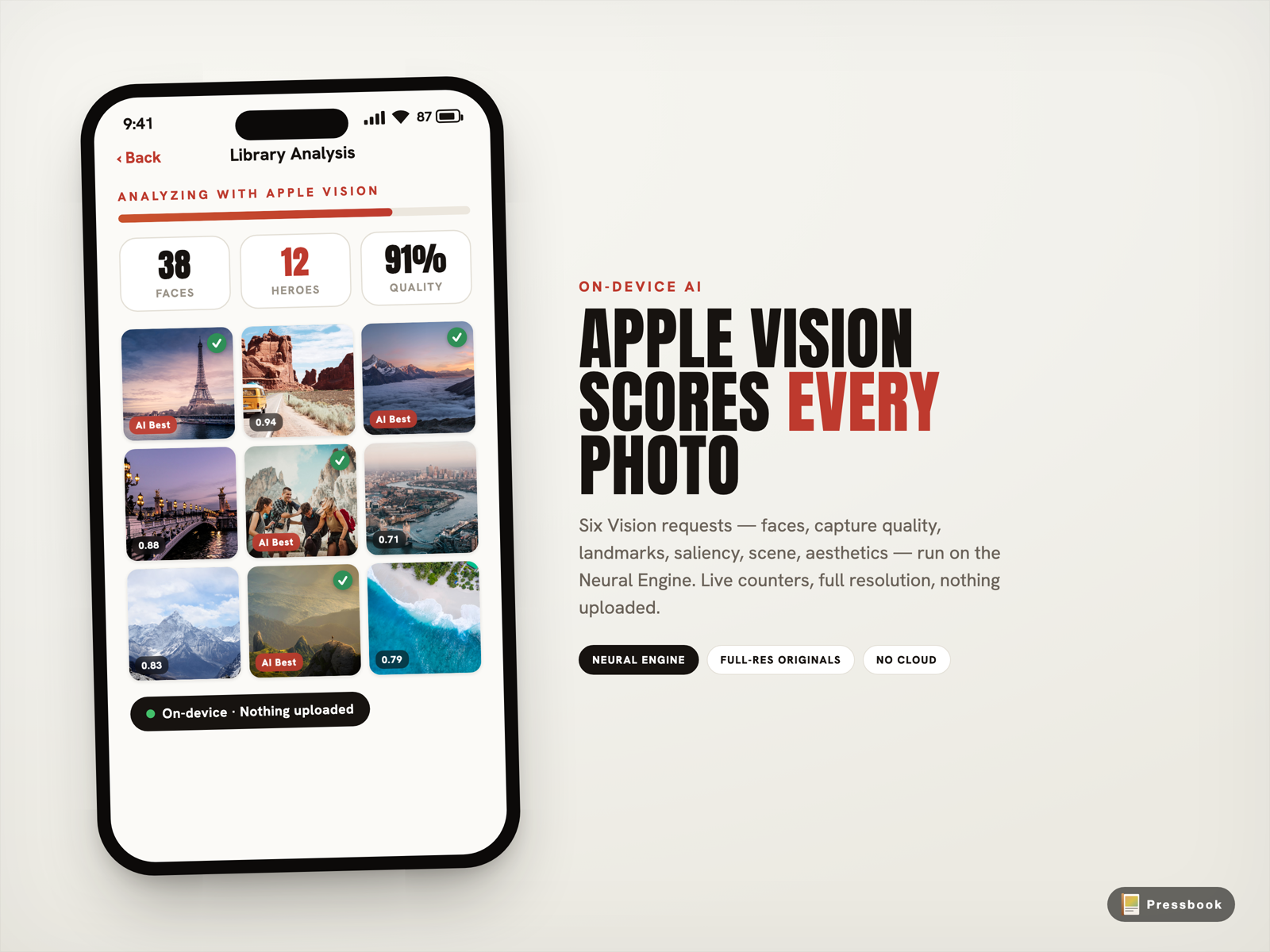
Tap Create Album and Pressbook runs the PhotoAnalyzer on every selected photo. It uses six exact Vision requests, all executing locally on the Neural Engine. The order is deliberate for speed and accuracy.
First, VNDetectFaceRectanglesRequest runs once. This gives one set of face observations so the dependent face tools align perfectly by index. No mismatches between quality, landmarks, and the faces themselves.
Then a single batch on the same image handler:
-
VNClassifyImageRequest labels the scene (beach, gathering, meal, indoor) so later grouping can create real chapters.
-
VNDetectFaceCaptureQualityRequest (fed the faces) scores sharpness, exposure, and framing for every face.
-
VNDetectFaceLandmarksRequest (fed the same faces) detects closed eyes, yaw, expressions, and head turns.
-
VNGenerateAttentionBasedSaliencyImageRequest maps where a viewer looks first. This drives hero picks and later smart crops in templates.
-
VNCalculateImageAestheticsScoresRequest delivers Apple's iOS 18+ overall aesthetic score (composition, lighting, color, appeal) plus the isUtility flag. Screenshots, receipts, documents, and whiteboards get tagged and filtered.
These raw signals plus a few derived numbers (average face quality, qualityScore combining aesthetics + faces) feed the rest of the system. No black box. Every decision traces back to these on-device results.
How the curator turns raw Vision scores into a real album
Raw numbers turn into decisions inside PhotoAnalysisCoordinator and DuplicateDetector.
Near-duplicates disappear automatically. Bursts and near-identical frames get a 64-bit dHash (difference hash, a fast perceptual hash). Within each group the best frame wins using face quality plus aesthetic score. The rest land in the "Near duplicates" bucket during review. You can still pull any of them back in.
True heroes rise. Photos with strong faces and high aesthetic scores become heroes. The system spreads them across chapters so an album doesn't become all headshots or all landscapes.
Chapters that feel like the day you lived. Time clustering plus the scene labels from VNClassifyImageRequest create natural breaks. "Breakfast on the patio." "Walk to the lighthouse." "Golden hour on the beach." No more flat walls of thumbnails.
The weak and the junk get flagged. Anything below the low-quality threshold or tagged utility by the aesthetics request goes into "Softer shots" or "Less distinct." You see why each one was set aside.
The AI never deletes a photo. You get the kept set plus the explicit buckets of what was set aside. Tap any bucket, drag photos back in, remove ones that don't belong. The AI gives the first cut. You stay in control.
(If you want the full no-upload workflow from camera roll to finished print-ready export, the companion post How to Make a Photo Book on iPhone With No Upload walks through every step.)
The review screen that shows you exactly what the AI did
This is where the difference clicks.
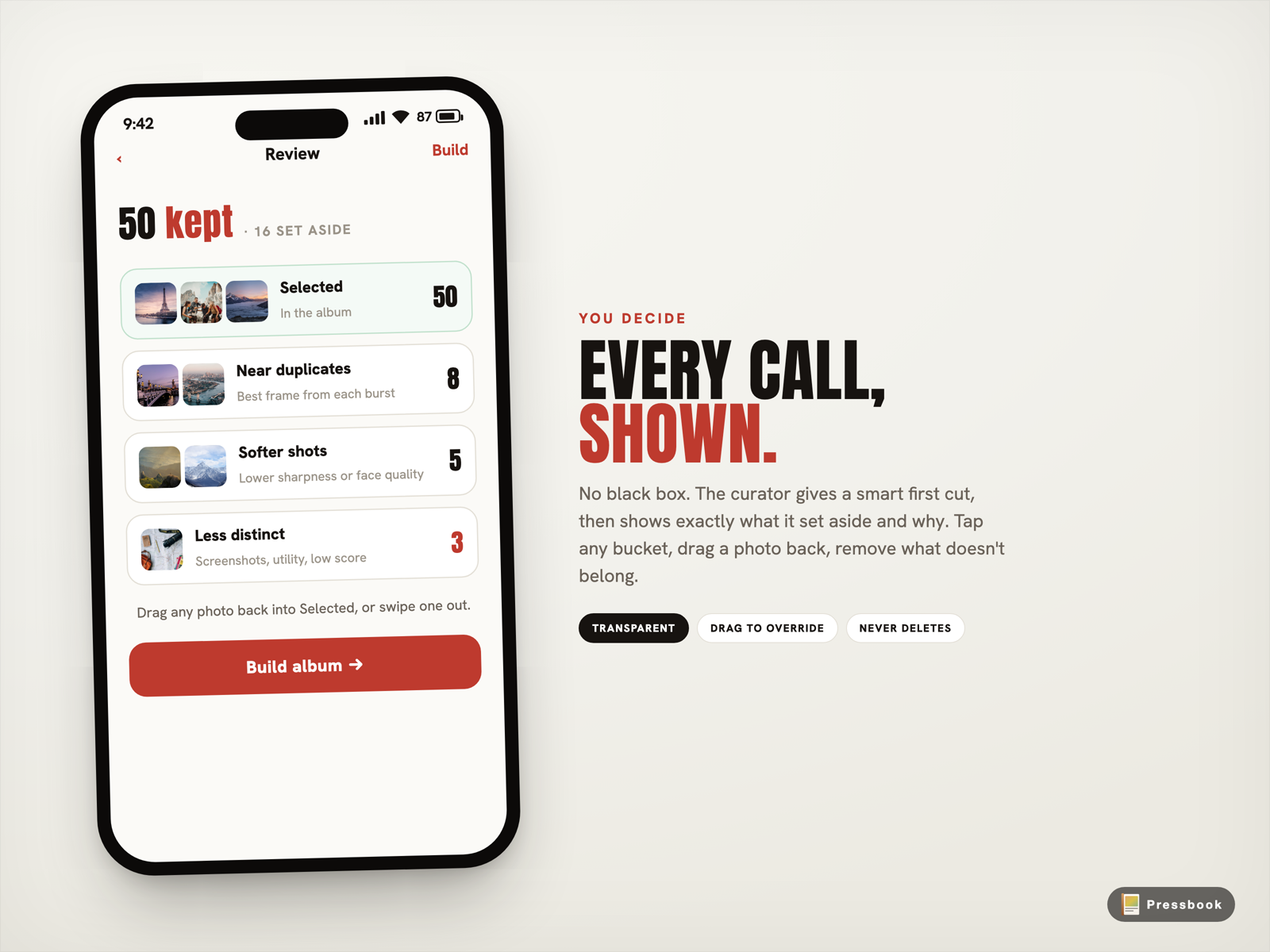
No black-box magic. You get a plain summary: "50 kept, 3 set aside." Then four explicit buckets you can tap:
- Selected: the photos the curator kept for the album
- Near duplicates: the best frame from each burst, the rest grouped here
- Softer shots: lower quality on face or aesthetic signals
- Less distinct: didn't rise to the top on combined scores
Open a bucket, see the photos and the reasons, then drag anything you want back into Selected. Or drop one that doesn't fit.
The AI proposes. You decide. The final album is always yours.
Why analyzing the original full-res files on your phone beats any cloud approach
Cloud services downsample before the AI ever sees the photo. Fine expressions, exact light, and burst timing disappear and never return. The resulting chapters feel generic because the model worked from approximations.
Pressbook works from the actual files that sit on your phone. The chapters match the day you lived because the real timestamps and content were never thrown away.
It also finishes fast. A couple hundred photos typically takes a minute or two. The Neural Engine is built for exactly this. You get live progress and a real percentage while everything stays on device. No upload heat. No waiting on round trips. No worry about what left.
Privacy that isn't marketing copy: it's built into the architecture
Because nothing ever leaves the device, entire classes of risk simply cannot happen:
- Your photos can never train someone else's model.
- No company holds copies that could be subpoenaed or breached.
- No server exists that could be hacked or change its policy tomorrow.
Project files use iOS file protection from the start. Lock the phone and the data stays unreadable without your passcode. The only eyes that ever see these photos are yours, or the people you choose to share an exported PDF or album with.
The finished album reads like the story you actually lived
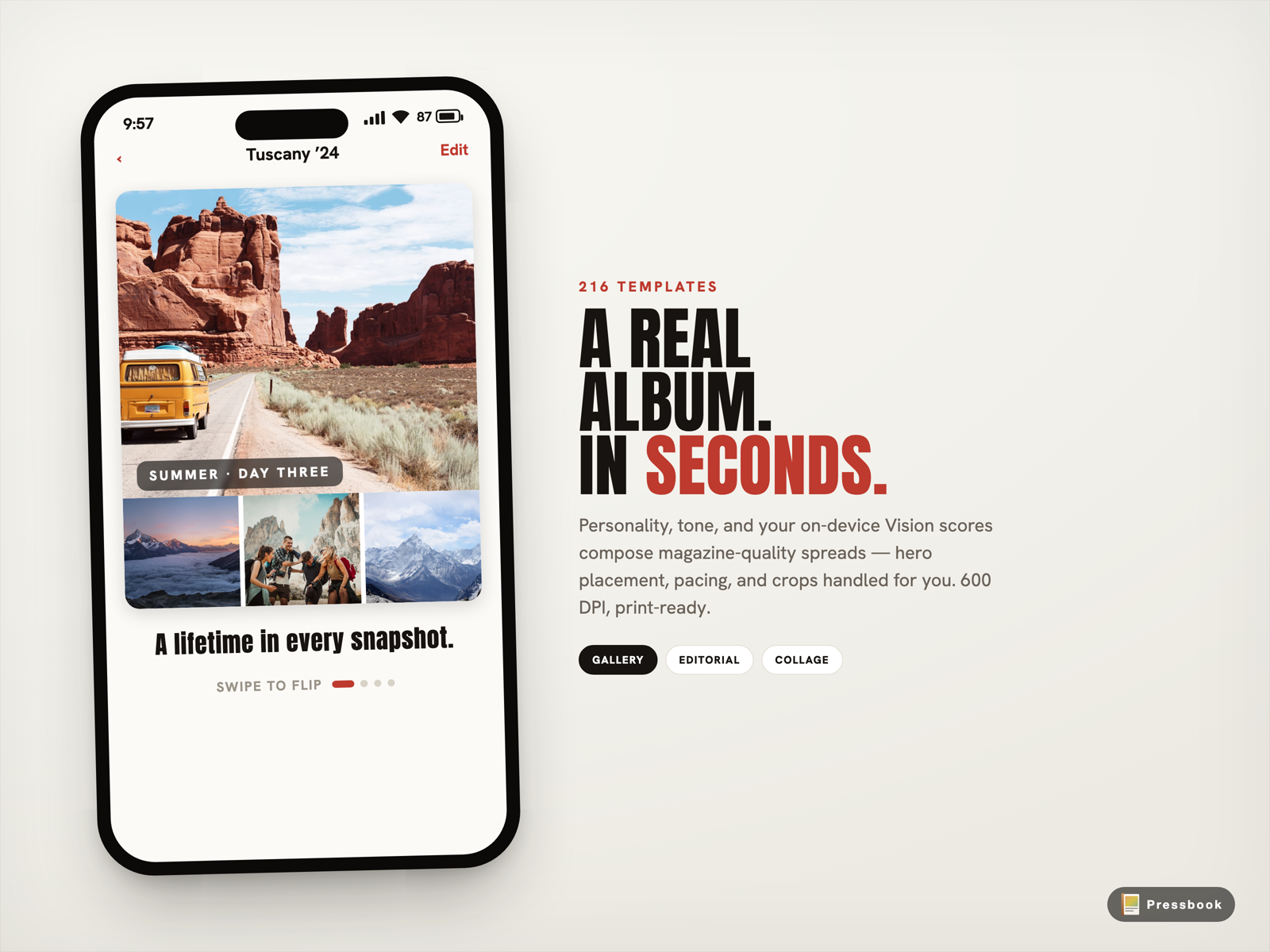
Good curation doesn't just pick winners. It hands the layout system the right ingredients: natural chapter breaks, strong hero images for each spread, balanced pacing, and variety.
Pressbook uses 216 hand-designed templates across Gallery, Editorial, and Collage personalities. With real material instead of random picks, the pages feel like a short photo essay instead of a printed contact sheet.
Nothing is final. After the first build you can:
- Switch personalities for a fresh layout style without touching your photo selections
- Return to review and pull photos from any bucket
- Add or drop shots anytime
- Re-export the same project at full 600 DPI whenever you're ready to print
The Vision scores and curation decisions live inside the project file on your device.
Try the curator with your own photos right now
Grab 80-120 real photos from your last trip or weekend. Let the on-device analysis run. It takes a minute or two on a modern iPhone. Spend a couple of minutes in review dragging anything back that feels important.
Build the album. Open it. You will feel the difference between a pile of photos and something that actually tells the story.
Start an album in Pressbook, free on the App Store, and watch the Vision framework score your own photos live. Nothing ever leaves your device.
Want the full no-upload workflow from camera roll to 600 DPI export? Read the companion post How to Make a Photo Book on iPhone With No Upload. For the bigger picture on why we build this way, see Why we built SideSwipe Labs. For the side-by-side with cloud services, read On-Device vs Cloud Photo Book Curation.
The best albums start with the photos you already have, and the intelligence already in your pocket.