On-Device Photo Captions on iPhone With Apple Foundation Models
You come back from a weekend with 200 photos. Pressbook scores them, groups them into chapters, lays them out. Then a question shows up that no layout engine can answer: what does this chapter say?
Most apps solve this by sending your photos and their context to a server and letting a cloud model write the words. The album gets its captions. Your photos and the story around them leave the device to make it happen.
Pressbook writes the words on your iPhone instead. Chapter quotes and photo captions come from Apple's Foundation Models running locally, with no upload. When the model isn't available, older iOS, Apple Intelligence off, a language it doesn't support, the app falls back to a curated library of quotes and tells you plainly which one it used.
It is optional, it is honest about what it did, and it never sends a photo anywhere to produce a sentence. iOS 26 and later.
The two frameworks behind it are worth separating first.

Two frameworks, doing two different jobs
This is the part people blur, so it's worth separating.
Apple's Vision framework scores every photo. Faces, quality, scene, mood, whether it's a screenshot. That decides which photos stay and how they group. It runs on every device Pressbook supports, and it does not write anything.
Apple's Foundation Models is the on-device language model. It writes. Pressbook uses it only for text: the chapter quotes between sections, and the captions under photos. It runs on iOS 26 and later, on devices with Apple Intelligence, entirely on the Neural Engine. Nothing it reads or writes leaves the phone.
Vision picks the photos. Foundation Models names them.
What it actually writes, and where
Two kinds of text, in two places.
Chapter quotes go on dedicated pages between time groups, the natural breaks in a trip or a day. A quote page is a split spread: a photo on one side, a short line on the other, set in the album's script font. One quote at a chapter break, not one per photo.
Captions go under photos on regular pages. Short lines, each tied to the photo nearest it.
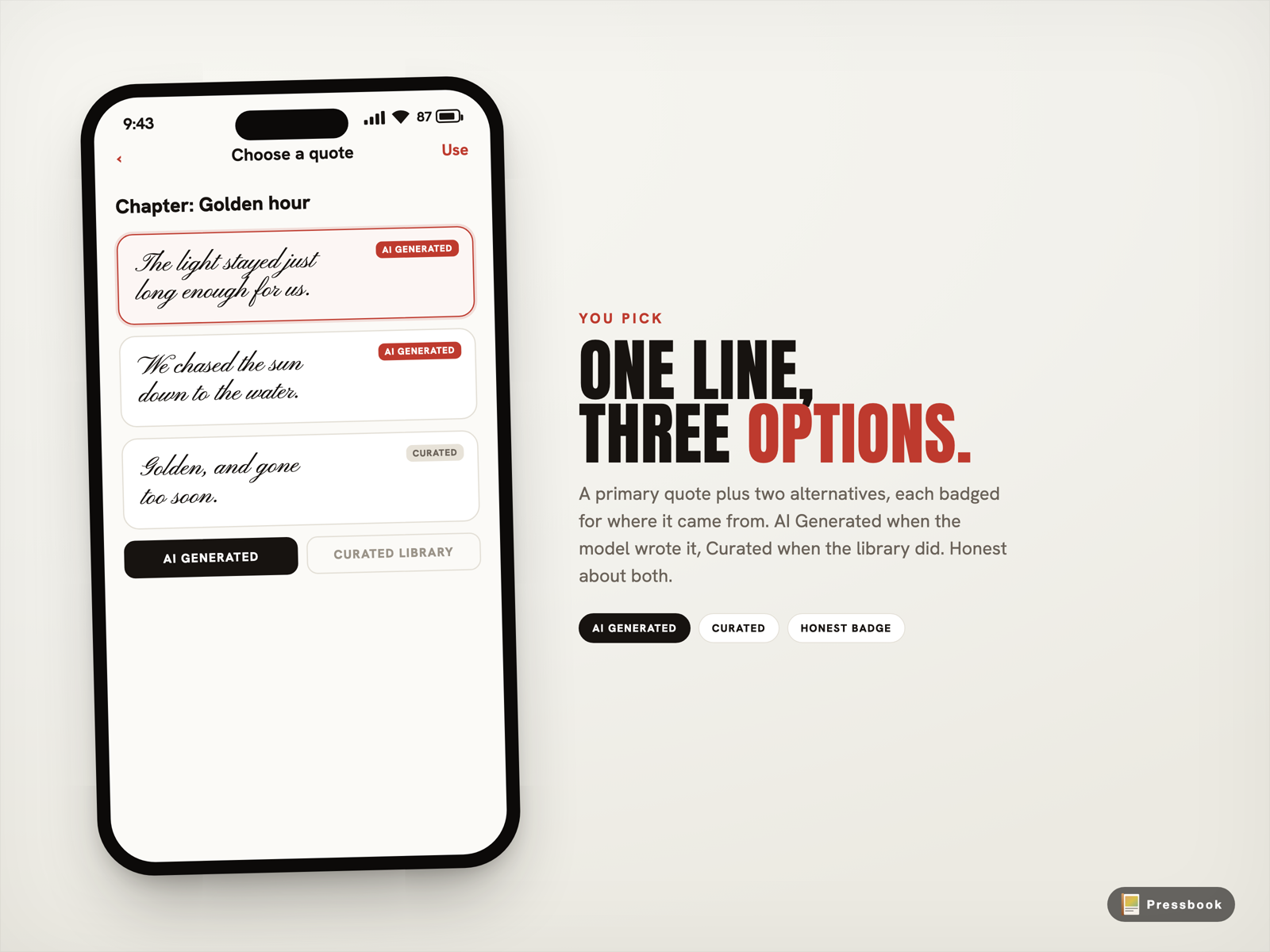
The model is asked for structure, not free text. A quote request returns a primary line plus two alternatives, each guided to be five to fifteen words, warm, and original. The prompt explicitly says no clichés. A caption request returns one line under fifteen words, with no hashtags. You see the options and pick.
When the model can't run
Foundation Models is not on every phone. Pressbook checks five things before it writes anything.
- The device runs iOS 26 or later. Below that, the framework doesn't exist, and the option is hidden, not broken.
- The hardware supports Apple Intelligence.
- Apple Intelligence is turned on in iOS Settings.
- The model has finished downloading, if it was still loading.
- The device's language is one the on-device model supports.
That last one matters more than it sounds. Pressbook ships in nine languages. The on-device model supports some of them, not necessarily all. Rather than ship a hardcoded list that goes stale, the app asks the system at runtime which languages the model supports, and only writes in a language the model actually speaks. The alternative is a model that defaults to English on a Hindi device, or refuses on a Korean one. The runtime check avoids both.
The honest fallback
When any of those checks fail, or the model throws halfway through a build, the app does not give up, and it does not fake it.
Quotes fall back to a curated library of eighty real quotes across ten categories: romantic, joyful, elegant, reflective, and the rest. The fallback is not random. It weights by the album type, the photo's mood, where the quote sits in the album, and the scene labels Vision already produced. A wedding opening leans joyful. A closing page leans reflective. A nature shot leans adventurous. Then it picks.
Captions fall back to mood-mapped pools. A joyful photo gets a joyful line.
And the app tells you which one it used. Every quote and caption carries a badge: "AI Generated" if the model wrote it, "Curated" if it came from the library. The code is explicit that it must not label a library fallback as AI-generated, even when the model was technically available but threw. The badge reflects what actually happened.
Why it runs when it runs
There's a real engineering reason the captions don't appear instantly, and it's worth saying plainly.
During the photo scoring pass, Vision runs on up to four photos at once to use the Neural Engine fully. If the language model ran at the same time, several concurrent model sessions alongside Vision would heat the device and slow everything down. So during scoring, every photo gets a fast static caption from a mood pool, not the model.
The model runs afterward, in two serial stages. First it writes the chapter quotes. Then it walks the content pages and replaces the static captions with model-written ones, one at a time. Serial, not parallel, on purpose. It costs a little wall-clock time to keep the phone cool.
Quote pages are off by default, so the quote stage is skipped unless you turn them on. Captions run automatically when Apple Intelligence is on, and you can turn the whole feature off in Settings.
A small, deliberate honesty
Two details are worth knowing because they're unusual.
The app filters scene labels before sending them to the model. Vision might label a wine bottle, a knife, a cigarette. Those are common in real albums and benign, but they can trip the on-device model's safety refusals. Pressbook strips labels likely to cause a refusal before they reach the model, so a photo of a toast doesn't come back empty.
And when you ask the model directly for a specific line, "write me something warm for an anniversary," and it can't, the app tells you it couldn't. It does not silently swap in an unrelated library quote and pretend it did what you asked. A failed request is reported as a failed request.
Nothing leaves to write a sentence
The chapter quote, the caption, the curated fallback, and the photo that prompted them all stay on your iPhone. The model is Apple's, running locally through Foundation Models. There is no network call in the path between your photos and the words on the page.
Any product analytics in Pressbook is opt-in and off by default, and it never includes your photos or the text it generates.
For the deeper story on how the photos get scored and grouped in the first place, read On-Device AI Photo Curation on iPhone. For why we build with no servers in the path of your data, see Why we built SideSwipe Labs.
Try it
Build an album from a recent trip. Turn on Quote Pages in Settings if you want chapter breaks with words. Let the model write. Read the badges. Swap any line you don't like, or write your own.
Start an album in Pressbook, free on the App Store.
The words come from the same place the photos do: the device in your hand.