Sharing a cycle without a server: how Fia's partner sharing works
Sharing your cycle can make a hard week easier: a heads-up before your period, a heat pack without having to explain. In our research, some people said they stay with an app mainly because sharing works in it. It's also a feature that can be turned against the person it's meant to help. This is how sharing works in Fia, and why each rule is there.
Why sharing is a safety question
Researchers who worked with survivors of intimate partner abuse found that abusers mostly don't hack anything. They use the ordinary features of apps and accounts they've been let into (Freed et al., 2018). One fertility app learned this in public: California's Attorney General settled with its maker in 2020 over a partner feature that, until 2016, linked anyone who asked and shared what a user logged without her approval. Researchers recommend letting people change what they share discreetly, and asking again over time whether they still want to (Levy and Schneier, 2020).
What people wrote about partner features in other apps pointed the same way: notifications about sex, a clinical "PMS today" ping, and a second subscription to pay for the partner.
How an invite works
You make an invite in Fia and send it however you like. It's a one-time link: it lets one person in, on one Apple Account, and it closes after 7 days if nobody uses it. When someone joins, Your people shows whose Apple Account it was.
Fia says it plainly when you make the link: "Send it only to them: whoever opens it sees what you choose here." The link carries the two names you typed, "and nothing else about you."
Since version 1.0.1, sharing starts as soon as your Fia sees that they've joined, with no code to check. The person you invite needs Fia on an iPhone or iPad, signed in to iCloud. Fia is free for them, with no account, and they don't need to track anything themselves.
What they see, and what they never see
| What you can share | When you invite someone |
|---|---|
| Your cycle day and phase | On |
| When your period could start, as a range, never "late" | On |
| A heads-up the day before that range opens | Off |
| Your fertile window, an estimate and never contraception | Off. Turning it on asks for Face ID, and it switches itself off after 90 days. |
| Check-ins you send: your energy, a few words, a short note | On. Nothing is sent automatically. |
| Asks | Always |
Fia only offers what fits your stage. There's no fertile window to share on hormonal contraception or in perimenopause, and no cycle at all in stages without one. You choose separately for each person.
Never shared, in Fia's words: "notes, your journal, symptoms you don't send, sex, contraception, tests, practice, your history or Apple Health." Nobody sees who else you share with.
Asking, without explaining
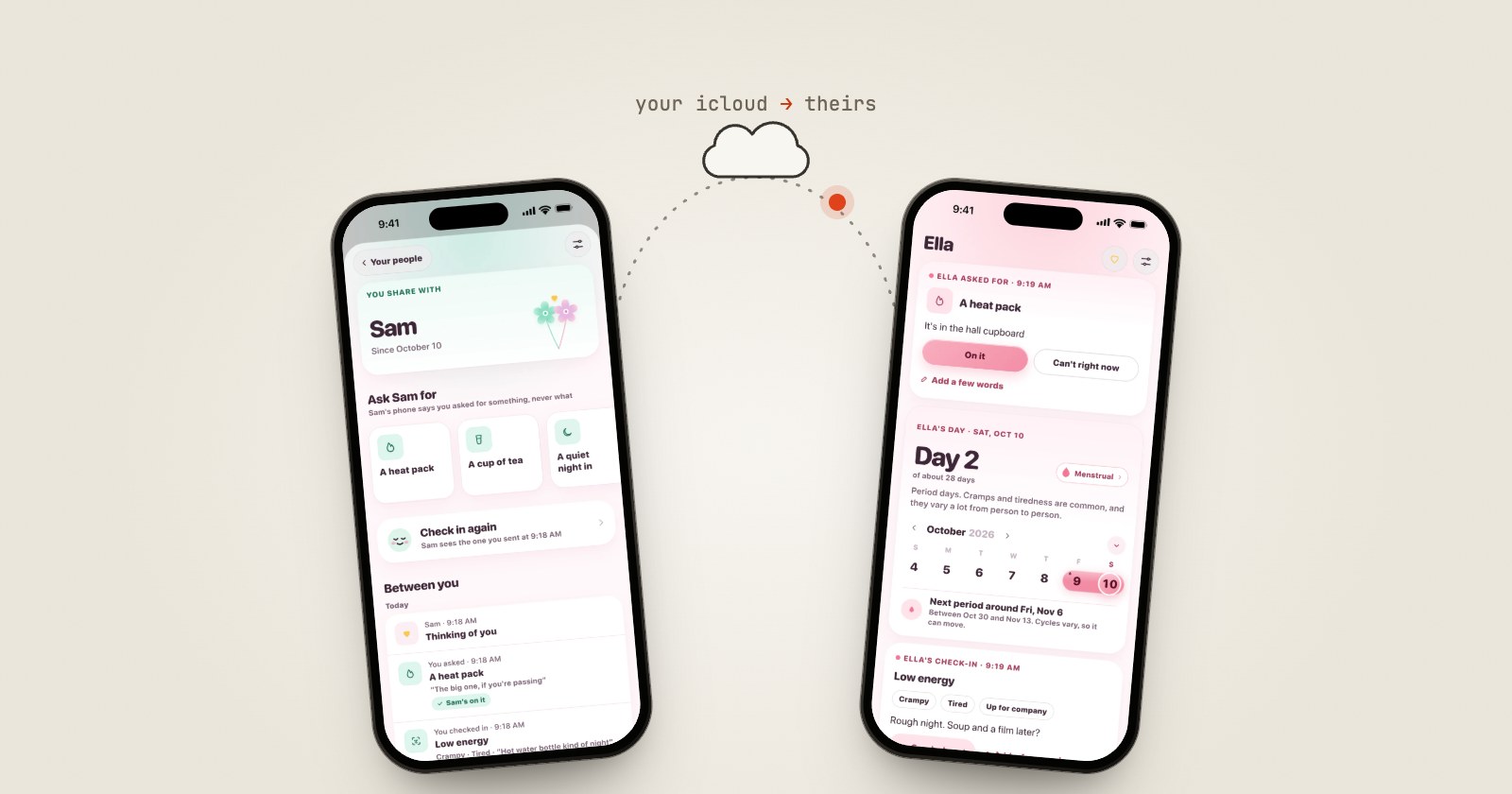
An ask is a small request: a heat pack, a cup of tea, a quiet night in, some space, or your own words. The person you ask sees it in Fia and answers "On it" or "Can't right now," with a few words if they like. Their lock screen never says what you asked for, only that you asked for something. An ask stays open for a day, and since 1.0.1 you can pin the ones you use most.
They can also send you a heart. There's no chat: they can't change what you share, and they can't message you beyond an answer or a heart.
Pausing, stopping, and a question every 90 days
- Pause, and they keep what they already have, but nothing new is sent, and they aren't told.
- Stop, and what you shared leaves iCloud. Their Fia forgets it the next time it opens. They aren't notified, though their Fia then shows that you aren't sharing right now. Anything they saved or screenshotted can't be taken back, and Fia says so before you stop.
- Every 90 days, Fia asks whether you're still happy sharing with each person. Nothing changes unless you change it.
- Sharing more asks for Face ID. Making a link, turning a choice on and resuming all ask. Sharing less never does.
- If a relationship changes, one screen offers to stop sharing with everyone, points you to Apple's Safety Check, and offers App Lock.
Where the data goes
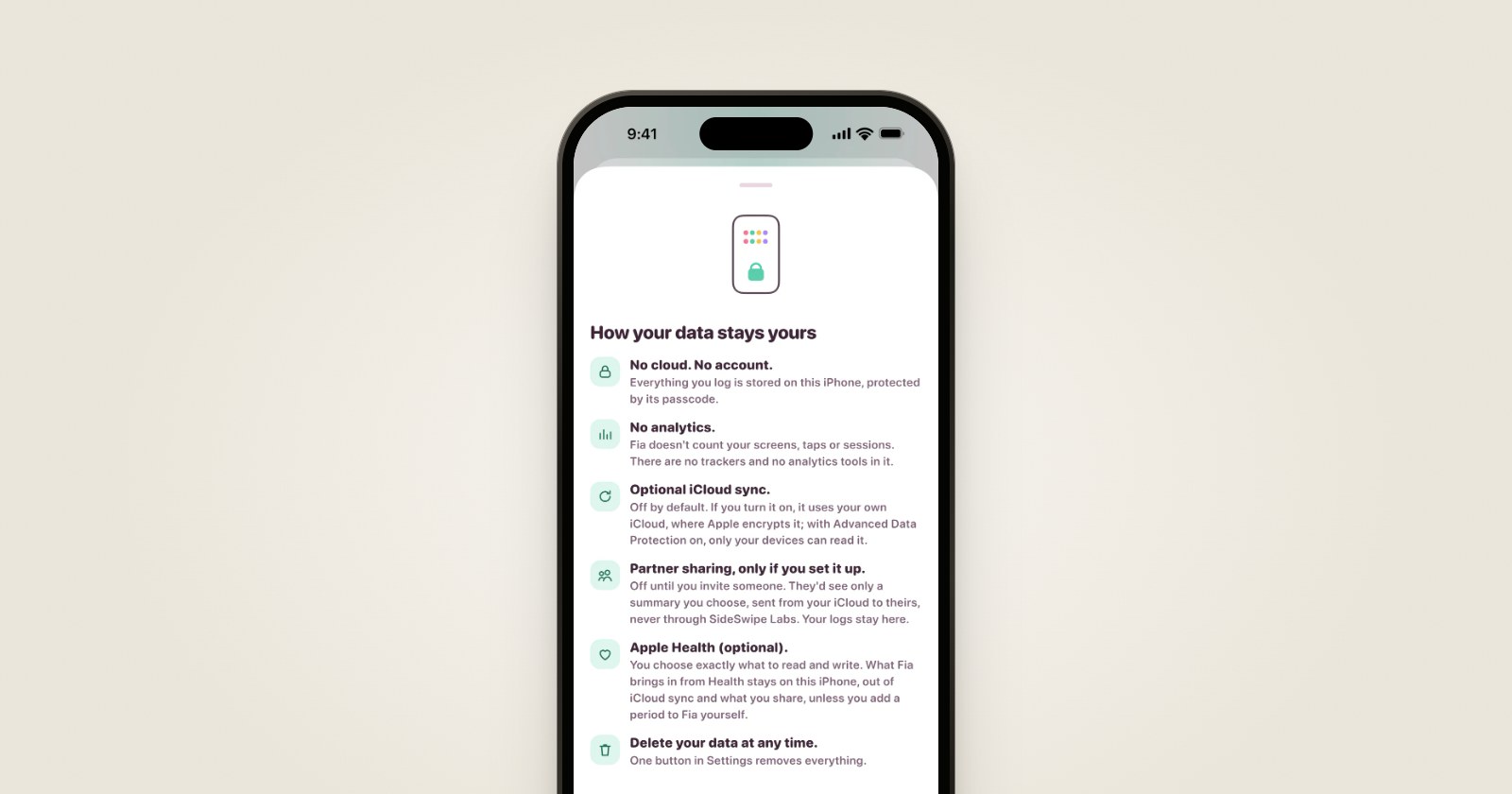
Each summary lives in a space in your own iCloud, shared with their Apple Account through Apple's CloudKit, in encrypted fields. Their Fia keeps a copy on their phone, protected by their passcode and left out of their backups. Their answers and hearts are stored in your iCloud too.
There is no SideSwipe Labs server in that path. Fia makes no network requests of its own: what leaves your iPhone goes through Apple's iCloud, to the people you chose. In the app's words: "Shared from your iCloud to theirs, in encrypted fields. Never through SideSwipe Labs."